Meshtastic: off-grid texting on $30 radios
Meshtastic turns cheap LoRa boards into a texting mesh that needs no cell towers, no internet, and no monthly bill, if you build it before you need it.
On this page
In brief
- Meshtastic turns cheap LoRa boards into a mesh that carries short texts and GPS positions with no cell service, no internet, and no monthly bill.
- Messages hop node to node by managed flooding: duplicates are dropped, distant nodes relay first, and the default limit is three hops.
- The default channel uses a public, well-known key, so anyone in range can read it. A private channel needs a key only your group holds.
- A first node costs about $18; the GPS-equipped T-Beam runs about $40 to $50, and the firmware supports ESP32, nRF52, RP2040, and Linux boards.
- Typical links run 2 to 5 kilometres, longer with height and clear sightlines; the community's listed range record is 331 kilometres.
The phone is charged. The screen lights up. It cannot say a word.
That is the moment Meshtastic is built for. Not a dead battery, a dead network: the towers are down, the Wi-Fi is gone, and the most powerful computer in your pocket has nothing to talk to. Meshtastic is open-source firmware that turns a cheap radio board into a texting network of its own, one that needs no tower, no carrier, no account, and no monthly bill. Your phone stays in the loop as the keyboard and the screen, paired over Bluetooth, while a small LoRa radio does the talking.
The network is the radios
A Meshtastic node is a small development board with a LoRa radio: an ESP32, an nRF52, an RP2040, or a Linux machine running the native daemon. You type in the phone app, the phone hands the message to your node over Bluetooth, Wi-Fi, or USB, and the node broadcasts it over the air. Any node in range that hears it may pass it on. There is no server in the middle and no account to create. The firmware repository is public under GPL-3.0, with 8,652 stars and 13,046 commits as of today, and the project dates to early 2020, when Kevin Hester built the first version for outdoor trips where the internet did not reach.
LoRa, the radio technique underneath, trades speed for distance. It sends a slow chirp that a receiver can pick out of noise far away, which is why a board the size of a matchbox can reach across a valley. The default modem preset, called LONG_FAST, is the project's compromise between range and speed. Nodes only hear each other when they share a region and a preset: in the United States that means the 902 to 928 megahertz band, license-free under the FCC's Part 15 rules, at up to 30 dBm.
How a message crosses a valley
The interesting part is what Meshtastic does not do. There is no routing table, no central map, and no node in charge. Instead the mesh floods, with manners. When a node receives a packet it has not seen before, and the hop limit has not run out, it waits a short random delay, then rebroadcasts it. The delay is weighted by the signal-to-noise ratio of the packet as received, so the nodes farthest away, the ones that carry the message furthest, tend to speak first. Nodes that hear a neighbor relay the same packet during their own delay drop their copy. The default hop limit is three, and the firmware caps it at seven. The docs put it plainly: really, three is fine.
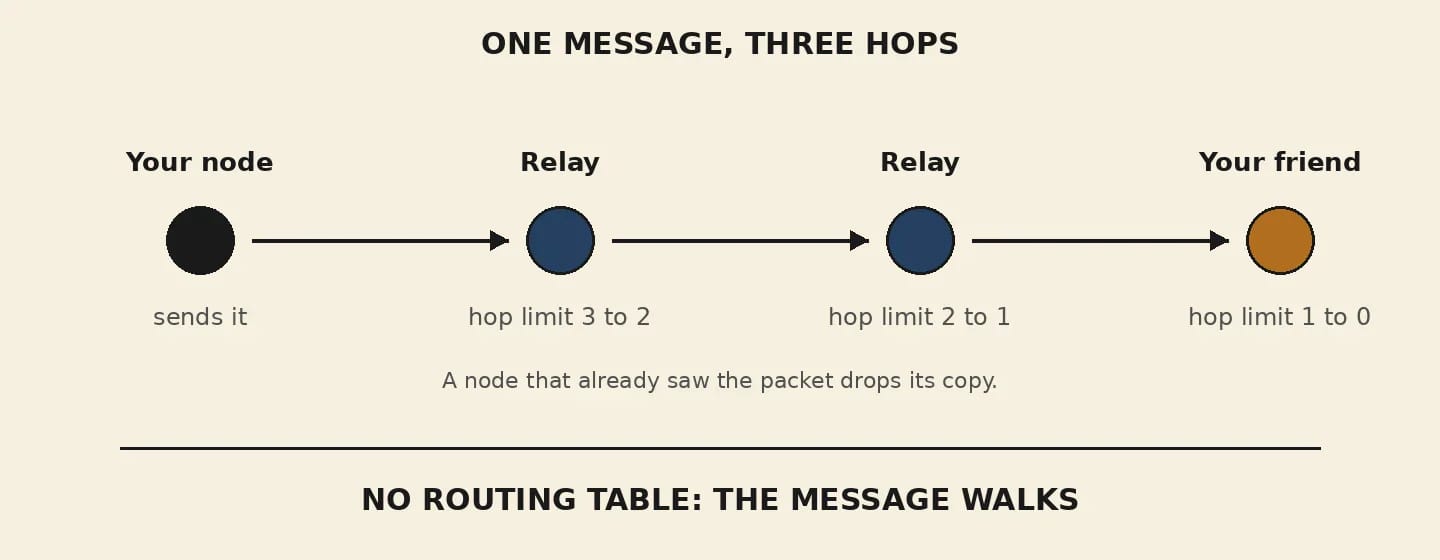
Direct messages take a shortcut. Once a node learns which neighbor provides a working route to a destination, it addresses the message to that one relay instead of letting every neighbor rebroadcast, and falls back to flooding if the relay does not answer. A message sent with an acknowledgment request is retried if no confirmation arrives: up to three times for a broadcast, five for a direct message.
The packets themselves are small, and that is a design limit, not a bug. A Meshtastic packet carries at most 239 bytes, and clients hold text messages to roughly 200 bytes, a couple of short sentences. The 16-byte header travels in the clear, carrying the routing information every node needs to forward a packet it cannot read, and the payload is encrypted with AES-256. Location sharing, telemetry, and the position reports that let a group see each other on a map travel the same way.
What it costs, and what to buy
A first node is cheap. The usual starter is the Heltec WiFi LoRa 32 V3, an ESP32-S3 board with a small OLED screen, at about 18 dollars. The LILYGO T-Beam, the default for a node that moves, adds GPS and a holder for an 18650 battery cell, and runs about 40 to 50 dollars. The T-Echo, a pocketable nRF52 unit with an e-ink screen and built-in GPS, runs about 55 dollars. The T-Deck adds a keyboard and a color touchscreen, so it works with no phone at all, at about 65 dollars. Those prices come from a current hardware buyer's guide and move with sellers and stock.
Two things to get right before ordering. Buy the frequency variant for your region: a 915 megahertz board for the United States, 868 for Europe, because a node on the wrong band hears nothing. And never power a board on without an antenna attached: the documentation warns, in capital letters, that transmitting with no antenna can damage the radio chip. Flashing is the easy part. The project's web flasher loads the firmware over USB, and the node will not transmit at all until a region is set, which keeps a new user inside the legal limits for their area by default.
The part people get wrong
Meshtastic encrypts its traffic, and that sentence has misled more than one new user. The default channel, channel 0, uses a blank name and a well-known key, AQ==, published in the documentation. Anyone running the same preset can read anything sent on it, including the position reports. That is the design: the public channel is how strangers find each other and how a local mesh forms. A private channel is a different thing, a channel with a name and a key only your group holds, and it takes a deliberate step to create one. The encryption is real. The privacy is opt-in.
The same honesty applies to range. The project's own pages promise several kilometers per link, and Wikipedia's entry on the project lists typical links at 2 to 5 kilometers, with links over 100 kilometers possible through a mesh and a community range record of 331 kilometers. Those long links need height, clear sightlines, and luck with terrain: hills, buildings, and dense trees block the signal, and a node in a valley hears nothing past the ridge. Reliability depends on having enough nodes around, because a mesh with one node is a walkie-talkie with extra steps.
Congestion is the other limit, and it has a public example. At the 2024 Hamvention in Dayton, Ohio, the network collapsed under excessive traffic from a single user's MQTT bridge, which links a mesh to the internet. The project answered with specialized firmware for large events, which Wikipedia's entry says now lets 2,000 to 2,500 nodes operate at once at conferences such as DEF CON. The lesson survives the fix: a shared channel is a shared resource, and one careless bridge can fill it.
Who it is for
The people who already use it say the most about what it is good for. Hikers carry it where the trail leaves coverage. Neighborhoods build small meshes as a second network for the long quiet days of a multi-day outage. The Mars Society, which runs simulated Mars missions in the desert, uses T-Echo radios for crew communication during analog missions, according to Wired's 2025 report on the project, cited in Wikipedia's entry. The firmware's own README names outdoor adventures, emergency preparedness, and remote operations as the intended uses.
It is not a replacement for 911 or a satellite SOS device, and it should never be the only plan when someone's safety is at stake. A text that arrives after three hops and a few seconds is a status update, not a rescue call. What it replaces is the silence after the towers go down: the hours when nobody knows whether the people down the road are fine.
Start with one radio
The honest way in is a single board and an evening. Order a Heltec V3 or a T-Beam in the right frequency for your region, flash it from the project's web flasher, set a region, and put it on the public channel to find the mesh near you. Walk it around the neighborhood and note where messages get through and where they stop: the gaps are where a second node, on a roof or a high shelf, earns its keep. Then make a private channel for your household, with a key only your people hold, and test it the same way. Two radios make a conversation. Three make a mesh. The network is built one rooftop at a time, and it is ready when the day comes that the phone in your pocket has nothing to say to the tower.