Ollama vs. llama.cpp: two doors into the same building
Ollama and llama.cpp look like rivals, but one is built on the other. Which one you want depends on whether you are chatting with a model or building on the engine.

On this page
In brief
- Ollama is a managed service layer built on llama.cpp's inference engine — they are not rivals, they are the front door and the engine room.
- Ollama gets you chatting in minutes: one install command, ollama run gemma4, a curated model library, and a REST API on localhost:11434.
- llama.cpp is the engine itself: llama cli and llama serve run GGUF models straight from Hugging Face, with every flag exposed.
- Pick by workflow: chat and build apps quickly with Ollama; embed inference, tune everything, or ship a product on the engine with llama.cpp.
- The catches: Ollama hides knobs and now has a cloud tier to switch off; llama.cpp demands you learn its flags and fast-moving CLI.
Ollama and llama.cpp are the two names that come up first when someone asks how to run a model on their own machine, and the question is usually framed as a contest. It is the wrong frame. Ollama is a managed service built on top of llama.cpp's inference engine — Ollama's own README lists llama.cpp as its supported backend. They are not rivals. They are the front door and the engine room of the same building, and the right choice depends on which door you need to walk through.
The short version: to chat with a model tonight, install Ollama. To embed inference in something you are building, or control exactly how the model runs, learn llama.cpp. To do both, start with Ollama — the engine underneath it is llama.cpp anyway.
Ollama: the front door
Ollama's pitch is setup speed. One install command — curl -fsSL https://ollama.com/install.sh | sh on macOS and Linux, irm https://ollama.com/install.ps1 | iex in PowerShell on Windows — gives you a background service, a command line, and a model library. From there, ollama run gemma4 downloads the model and drops you into a chat. The site claims 9M+ installs a month and over a billion model downloads; the library backs up the scale, with Llama 3.1 at 121 million pulls.
What you are getting is a service layer: a local server on localhost:11434 with a simple REST API — POST /api/chat and /api/generate — plus official Python and JavaScript libraries, so scripts and apps can talk to a local model without knowing how inference works. Models are pulled by name from a curated library, stored under ~/.ollama/models on macOS, and managed with plain commands: ollama list, ollama ps for what is loaded and where, ollama stop to unload. Models stay in memory for five minutes after last use by default. The default context window is 4,096 tokens.
That convenience costs abstraction: Ollama picks the quantisation, the backend, and most sampling defaults for you, and a Modelfile only goes so far — the knobs are fewer and further from the metal. There is also a newer wrinkle: a cloud tier. Names ending in :cloud run on Ollama's servers, need usage credits or a paid plan, and your prompts leave the machine. Local runs never send prompts to ollama.com, per the FAQ, and cloud features switch off entirely with disable_ollama_cloud or OLLAMA_NO_CLOUD=1. The local-only story is still true, but it is now a setting rather than the whole product.
llama.cpp: the engine room
llama.cpp is the C and C++ inference engine that does the actual work, built on the ggml tensor library, aiming for LLM inference with minimal setup and state-of-the-art performance on a wide range of hardware. More than 135,000 stars on GitHub underline how central it has become, and version 1.0.0 shipped on November 13, 2026 — a stability promise for the public C API we covered when it landed.
There is no model library and no background service. You install it — curl -LsSf https://llama.app/install.sh | sh, a PowerShell equivalent, prebuilt binaries, Docker, or a build from source — and run models directly, usually straight from Hugging Face in GGUF format:
llama cli -hf ggml-org/Qwen3.5-0.8B-GGUF
llama serve -hf ggml-org/Qwen3.5-0.8B-GGUF
The first chats in the terminal; the second starts an OpenAI-compatible API server with a web UI. Everything between them is flags you control: GPU backend, GPU offload, context size, KV cache type, quantisation, sampling, speculative decoding. That is the whole point — and the learning curve is real. The CLI surface moves fast, flags get renamed, and the docs assume you read a README and a --help screen rather than clicking through a setup wizard.
In return you get the full machine: the same hardware Ollama uses — Nvidia cards with compute capability 5.0 and up, AMD through ROCm and Vulkan, Apple Silicon through Metal, plain CPUs — with Ollama's choices exposed as flags. And because so much of local AI is built on it, learning those flags transfers: the same engine sits underneath Ollama, LM Studio, and a long tail of apps and agents.
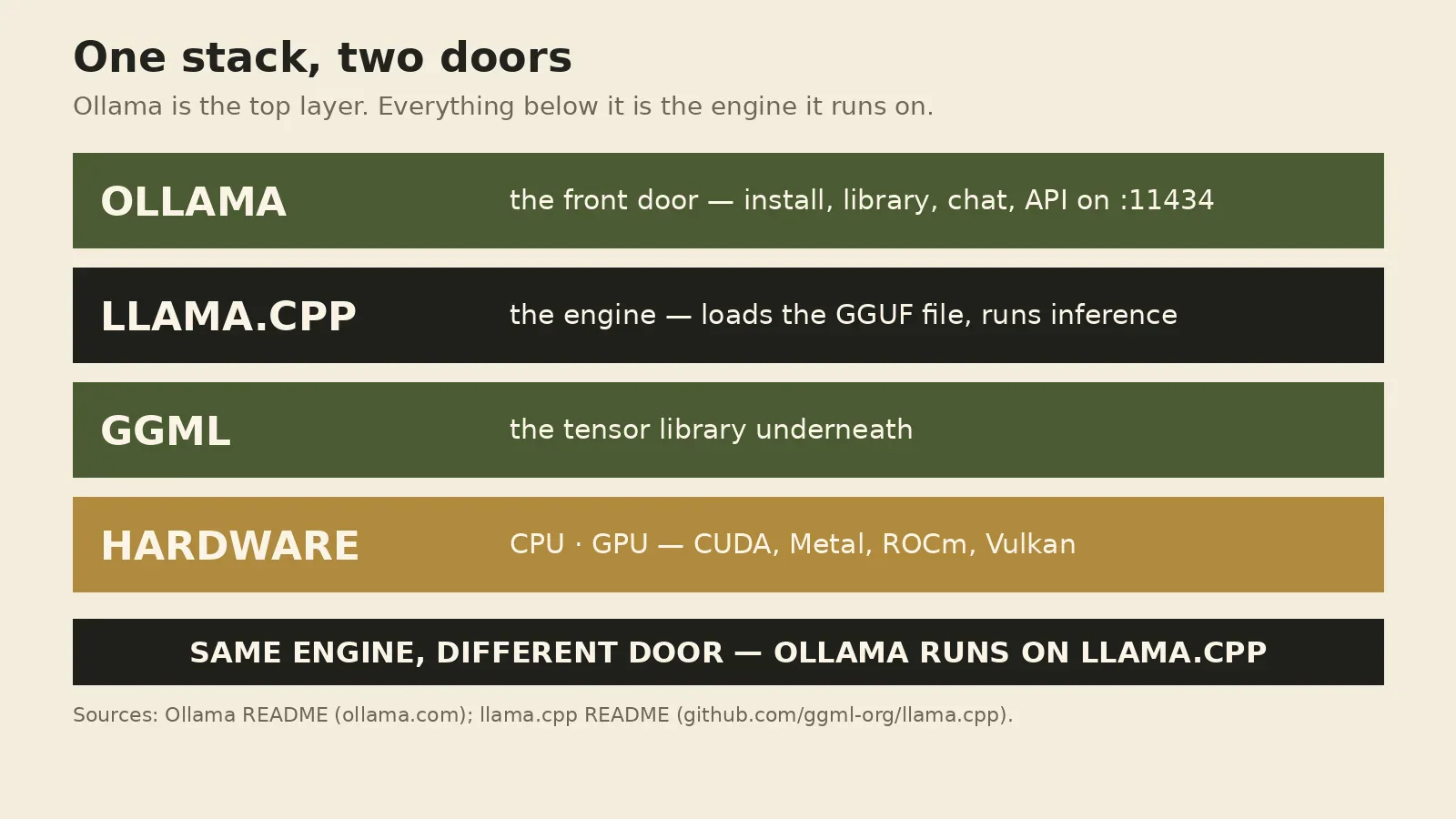
The same model, two doors
The diagram above is the whole comparison in one picture. Ollama is the top layer: installer, library, chat command, API on port 11434. llama.cpp is the layer underneath: the engine that loads the GGUF file and turns tokens into text. ggml is the tensor library below that; hardware is the bottom. ollama run gemma4 travels down through all four layers; llama cli skips the top one and talks to the engine directly.
That is why "which is faster" is usually the wrong question: both run the same weights through the same engine on the same hardware, so a speed gap is mostly a gap in defaults — context size, batching, GPU offload — not a property of either tool. Benchmarks without settings mean nothing.
How to choose
Pick by what you are doing this week, not by which project you admire more.
Chat with a model, or wire one into an app. Ollama: one install command, a curated library, a documented API, and ollama ps telling you plainly whether your model is on the GPU — including when you hand a local model to an agent or editor integration.
Embed inference in something you are shipping. llama.cpp, or a library built on it. The 1.0 release exists so downstream projects can depend on the public C API without surprise breakage.
Tune everything, or run unusual hardware. llama.cpp. If you care about KV cache types, offloading splits, or a backend Ollama does not expose, those knobs exist only in the engine.
Run the biggest model your hardware can hold. Either, but do the arithmetic first: a 70-billion-parameter model at 4-bit quantisation needs roughly 40 GB for the weights alone, before context — Ollama's FAQ shows a 70B model at 42 GB. The limit is your VRAM and RAM, not your choice of door.
The catches, stated plainly
Ollama's catch is that convenience is a trade: fewer knobs, a curated library instead of the whole of Hugging Face, and a cloud tier to switch off if local-only is the point. None of that is a reason to avoid it — but read the settings instead of assuming the defaults match your threat model.
llama.cpp's catch is that the engine room has no concierge: you choose the GGUF file, the quantisation, the flags, and the build. The project moves quickly — the CLI was still being renamed around the 1.0 release — so a six-month-old tutorial may not work verbatim. And "runs anywhere" is not "runs fast anywhere": a large model on a CPU-only laptop will answer, eventually.
The bottom line
There is no winner to declare, because there was never a race. Ollama is what you install when you want a model running with the least friction; llama.cpp is what you learn when you want to understand — or control — how it runs. Most local-AI users end up using both: Ollama daily, llama.cpp when the defaults get in the way. Start at the front door; the engine room is underneath it whenever you are ready.