Gitleaks: scan your git history for secrets before anyone else does
Gitleaks scans your entire git history for leaked keys and tokens — and finds the ones you thought you deleted.

On this page
In brief
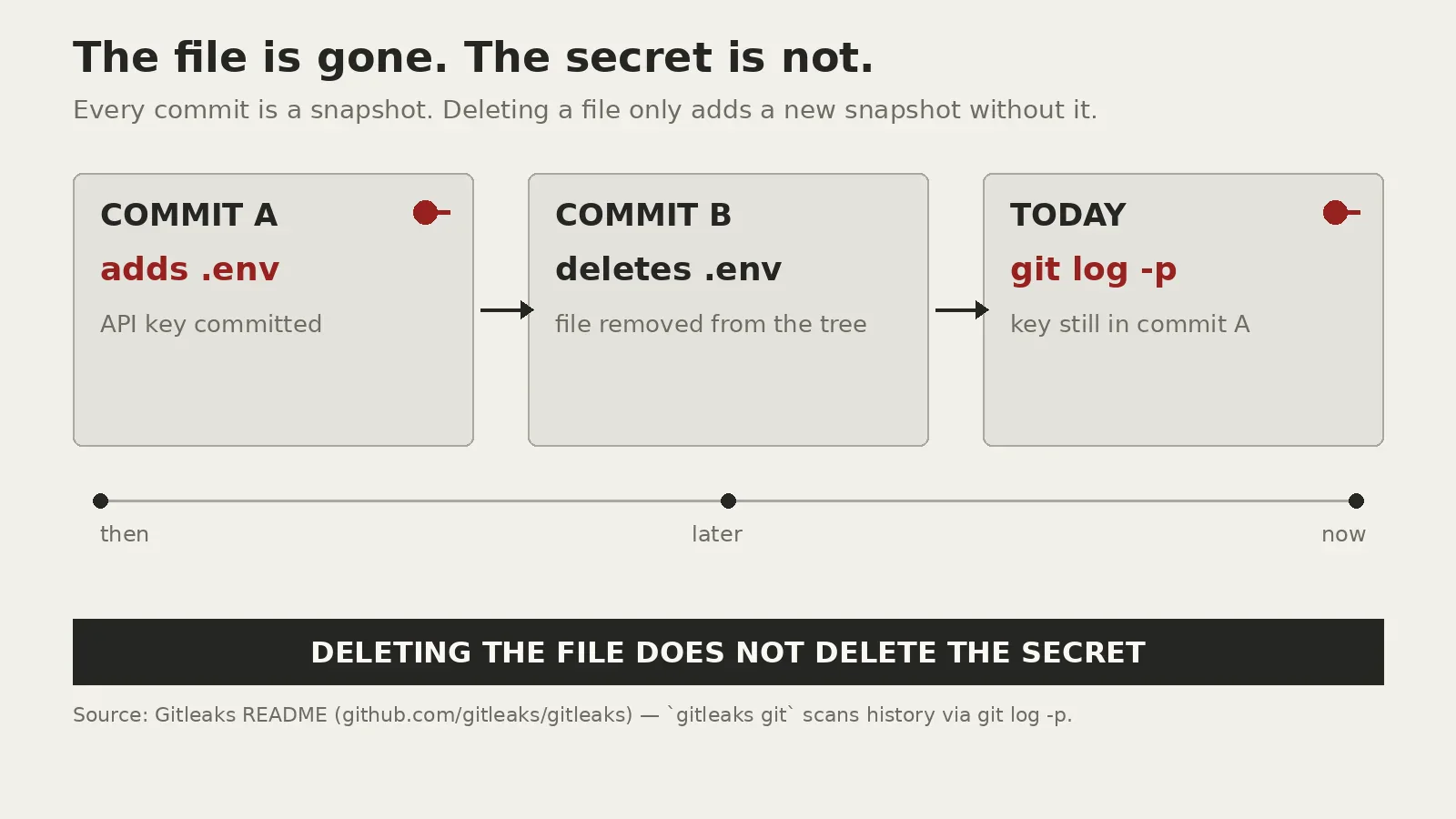
- Deleting a file does not delete the secret: git history keeps every version, and Gitleaks scans all of it.
- Three modes — git, dir, stdin — plus a pre-commit hook and a GitHub Action, with exit code 1 failing the build on a finding.
- 222 default detection rules, baselines for old findings, composite rules in v8.28.0, and optional decoding and archive scanning.
- The maintainer calls it feature complete: v8.30.1 (March 2026) is the latest release, with security patches only and focus shifting to Betterleaks.
- When it finds a live secret, rotate the credential first — then purge history. GitHub says the same.
Deleting a file from your repository does not delete the secret that was in it. Git keeps every version of every file, in every commit, forever — and anyone who clones the repo gets the whole history, including the API key you removed months ago. Gitleaks is the small, fast tool that finds those secrets before someone else does: it scans your full git history, your working tree, or anything piped through stdin, and reports where each one lives.
Gitleaks has been around since 2018, is written in Go, is MIT-licensed, and has more than 31,000 stars on GitHub. Its default configuration ships with 222 detection rules, counted from the project's own configuration file.
The secret outlives the file
The failure mode is embarrassingly ordinary. Someone hardcodes a credential while debugging, commits it, notices, deletes the file, and commits again. The secret is still there, in the earlier commit, retrievable with git log -p — same for .env files committed by accident.
Recent grep.tips breach stories keep coming back to the same shape: credentials stored where they should not have been, then found by someone looking. Cursor's October breach traced back to a key exposed at its vendor Fireworks AI we covered the chain here. The Grok Build apps that ended up open to the internet included plaintext passwords we covered that here. The leak usually happened long before anyone noticed.
What Gitleaks actually does
Three scanning modes: gitleaks git scans a repository's history, commit by commit; gitleaks dir scans a directory or a file; gitleaks stdin reads from a pipe — a log stream, a backup, another tool's output.
The detection engine is regex — the README points to a blog post titled "Regex is (almost) all you need". Each rule is a pattern plus context: a known token format, an entropy check, and allowlists to cut noise. A finding reports the secret, the rule, the file and line, the commit, the author, and a fingerprint. The default exit code is 1 when leaks are found, so a failure stops the build, the hook, or the pipeline step.
Version 8.28.0 added composite rules, which only fire when a second, related pattern appears nearby. Gitleaks can also decode hex, percent-encoding, and base64, and look inside zip files and tarballs — off by default, for the thorough pass.
Running your first scan
On macOS: brew install gitleaks. With Docker: pull zricethezav/gitleaks or ghcr.io/gitleaks/gitleaks. Or clone the repo and make build. Then:
gitleaks git -v .
A finding looks like the README's own example: a Sidekiq secret in a commit, with the rule ID, entropy, file, line, commit, and author. Add --redact and the secret is masked — important if the scan log will be stored or pasted into a ticket. Reports come as JSON, CSV, JUnit, or SARIF for CI ingestion.
The first scan of an old repository will find things. The answer is the baseline: run a full scan, save the report, and pass it back with --baseline-path on later runs. Old findings are ignored; only new ones fail the build — you are not pretending the old secrets do not exist, just refusing to let them block every commit while you rotate them.
The pre-commit hook and CI
The highest-value place to run Gitleaks is before the secret ever reaches the remote. The project ships a pre-commit hook: add the repo to your .pre-commit-config.yaml (the README pins v8.24.2), run pre-commit install, and every commit is scanned first. A commit containing a secret fails and nothing leaves your machine. SKIP=gitleaks bypasses it once.
The same binary belongs in CI. The project ships a GitHub Action, and the exit-code behaviour makes it one workflow step: run the scan, fail on findings, done. The older detect and protect commands were deprecated in v8.19.0 — translate them if you follow an older tutorial.
The feature freeze — read it before you adopt
One caveat sits at the top of the README in a warning box: "Gitleaks is feature complete. I'm not merging new features into Gitleaks. Future releases will be security patches only. I'm shifting my focus to Betterleaks."
The tool is not abandoned — the latest release, v8.30.1, shipped in March 2026, and the project is public and unarchived. But it is finished in the maintainer's eyes — do not adopt it expecting new detection rules for the next wave of services. What you get is a stable scanner with a frozen feature set and security maintenance — a reasonable trade, since the 222 rules already cover the services most people leak. If a provider invents a new token format, Gitleaks will not learn it on its own; you will add a custom rule, or move to the successor. Custom rules are a first-class feature, so the freeze is a ceiling, not a wall.
Gitleaks vs. the alternatives
GitHub's own secret scanning is the zero-effort option if your code lives on GitHub: free on public repositories, it scans the entire history on all branches plus issues, pull requests, discussions, wikis, and secret gists, notifies providers of partner credentials, and checks whether a secret is still active. Private and internal repositories need GitHub Secret Protection on a Team or Enterprise Cloud plan.
TruffleHog, from Truffle Security, is the thorough one: it classifies more than 800 secret types and verifies what it finds by logging in, so a finding can be confirmed live. It also scans beyond git — GitHub organisations, S3 buckets, Docker images, Hugging Face. The cost is scope and weight: AGPL-3.0, network calls to verify secrets.
Gitleaks sits between them: lighter than TruffleHog, more portable than GitHub's scanner, runnable anywhere — your laptop, a pre-commit hook, a self-hosted runner, a repo that has never touched GitHub. It does not verify whether a secret is still live, so its findings need a human to confirm. For the common case — "is there a secret in this repo's history, yes or no, and where" — that is the right trade.
When it finds something: rotate first
When a scan finds a live secret, rotate the credential first, then clean up the history. GitHub's own documentation says the same — rotate immediately, because removing a secret from git history is time-intensive and often unnecessary once the credential is revoked. A leaked key that no longer works is a curiosity; one that still works is an incident.
Only after rotation, purge the history with a tool built for it like git filter-repo. Purging your copy does not purge every clone, fork, or cached copy — if the secret was ever public, assume it was copied. That is why the pre-commit hook matters more than the history scan: the scan finds the damage, the hook prevents the next one.
The bottom line
Gitleaks will not make your secrets safe. It will tell you, quickly and precisely, that they are not. Install it, run it on your repositories tonight, set up the pre-commit hook, put it in CI. The first scan will probably be uncomfortable — that discomfort is the whole product, and it is much cheaper than the version where someone else scans your public history.