Proton vs. GE-Proton: which compatibility layer should run your games?
Valve's Proton lets Windows games run on Linux, and a community build called GE-Proton ships the fixes Valve hasn't yet. Here's how to choose between them, and when to switch.

On this page
In brief
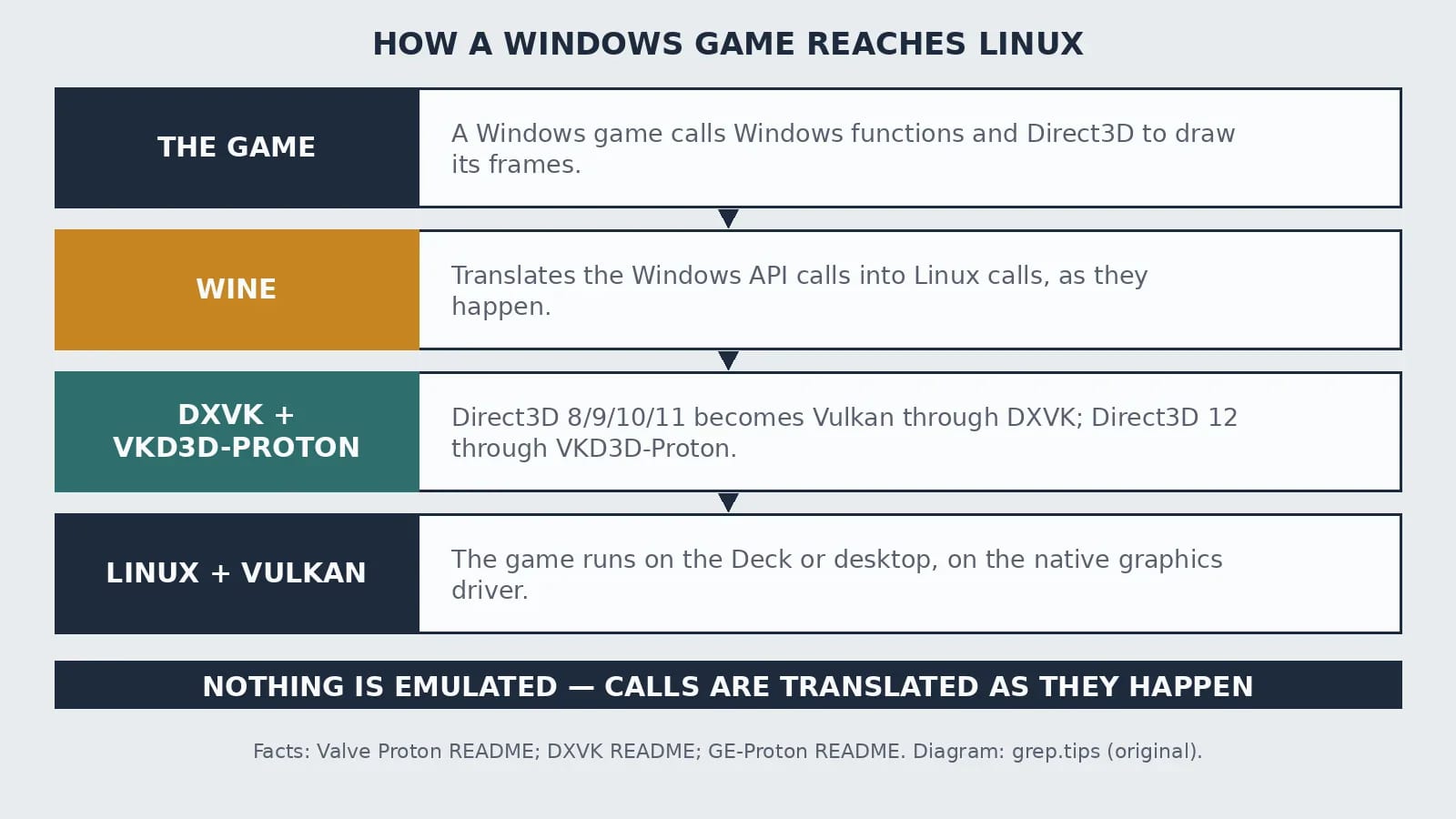
- Proton translates Windows games to Linux at runtime: Wine handles the Windows API calls, and DXVK and VKD3D-Proton turn Direct3D into Vulkan.
- Valve's Proton is the default in Steam and the safe choice for most games; GE-Proton is a community build on Proton Experimental's bleeding-edge Wine.
- GE-Proton adds media-playback fixes, FSR patches, NVIDIA CUDA support for PhysX, and protonfixes, which applies per-game fixes automatically.
- Check ProtonDB before buying or switching: it counts more than 32,000 games with a recommending report, and anti-cheat is still the hard limit.
A large share of the Steam Deck's library was written for Windows. The handheld runs SteamOS, a Linux system, and the games in its store were mostly built for the other operating system. That should be a problem. It mostly is not, and the reason is a compatibility layer called Proton.
Proton sits between a Windows game and the Linux system underneath it. When the game asks Windows for something, a file, a window, a frame of graphics, Proton answers in Linux terms, at runtime, without the game knowing anything changed. Valve ships it with Steam. It is the reason the Deck's library is as large as it is, and the reason many desktop Linux users can play Windows games without keeping a Windows install around.
There are two Protons, and that is the question this piece answers. Valve maintains one. A community developer known as GloriousEggroll maintains the other, called GE-Proton. They are the same project at different speeds: Valve's is the tested release, GE's is the bleeding edge with the fixes Valve has not shipped yet. The choice between them is a per-game decision, and it has a simple rule.
What Proton actually does
A Windows game expects Windows. It calls Windows functions to open files, draw windows, and talk to the graphics card, and it speaks Direct3D, Microsoft's graphics interface, when it wants a frame drawn. None of that exists on Linux, so Proton translates. Wine, the compatibility layer Proton is built on, handles the Windows calls. DXVK, a separate open-source project, translates Direct3D 8, 9, 10, and 11 into Vulkan, the cross-platform graphics interface Linux uses. VKD3D-Proton does the same job for Direct3D 12. ProtonDB, the community compatibility site, describes Proton as a bundle of tools like Wine and DXVK that a gamer would otherwise have to install and maintain themselves.
That distinction matters because Proton is not an emulator. Nothing pretends to be a Windows machine. The game runs natively on the Linux processor, and its calls are translated as they happen. The cost is the translation itself: a call that has to cross from one interface to another takes longer than a call that does not, and some things translate badly. The benefit is that most games never notice. Valve's own description is modest about the whole arrangement: Proton is a tool for use with the Steam client that allows games exclusive to Windows to run on Linux, and most users should use the version Steam provides.
Steam handles the details. Proton ships with the client, and a game that needs it gets it without the player doing anything. The version can be set for the whole library in the Steam Play settings, or for one game in its Properties, under Compatibility, by forcing a specific Steam Play compatibility tool. That per-game switch is the mechanism the rest of this piece turns on.
Valve's Proton: the default
Valve's Proton is the conservative choice, and conservatism is the point. The project is public on GitHub, where it has 33,369 stars and a default branch named proton_11.0, and its releases read like a repair log: each one makes a list of games newly playable and fixes regressions in the last release. The current release, Proton 11.0-3, published November 24, 2026, restores a long list of games that broke under 11.0, fixes video playback in several more, and updates the graphics translators to their Proton 11 support branches. The 11.0 line also brought Wine Mono up to 11.3.0 and the Xalia launcher helper to 0.5.0.1.
That pace is the argument for staying on Valve's build. A stable release is a promise that someone tested the combination you are about to run, and the changelog is the receipt. Proton Experimental is the exception: a rolling branch Valve updates continuously, where fixes land first. GE-Proton is built on that branch, which is why it is usually ahead and occasionally rougher.
GE-Proton: the community build
GE-Proton is one person's build of Proton, and it runs ahead of Valve's releases. GloriousEggroll builds it from Proton Experimental's bleeding-edge Wine and adds the patches Valve has not taken yet. The repository is public, with 15,386 stars and 239 releases, and the current release, GE-Proton11-14, landed November 23, 2026.
The differences are specific, and they are the reason people install it. GE-Proton carries extra media-foundation patches, so cutscenes and intro videos that play black under Valve's Proton often play here. It adds AMD FSR patches that can be switched on with an environment variable, NVIDIA CUDA support for PhysX and NVAPI, and a system called protonfixes, which applies per-game fixes automatically: the winetricks changes, environment variables, and workaround settings a game needs, applied when the game launches. It also backports upstream Wine patches and applies wine-staging patches as they are needed, and it enables NTSync, the newer kernel synchronization primitive, when the kernel supports it.
None of that makes it Valve's Proton with extras. The README says the build is not affiliated with Valve, and a problem that happens on GE-Proton but not on Valve's Proton belongs on GE's issue tracker, not Valve's. It is also a build you install yourself. Download a release from GitHub, extract it into the compatibility-tools folder in your Steam directory, restart Steam, and select it per game. ProtonPlus, a small graphical manager, does the same job without the terminal. The Flathub and Snap builds of GE-Proton are explicitly unsupported by its author, and running GE-Proton outside Steam is only supported through umu, a launcher that recreates Steam's runtime; Heroic enables umu by default, and Lutris uses it when GE-Proton is selected.
The bleeding edge cuts both ways, and the current release notes say so. GE-Proton11-14 records that Cyberpunk 2077 can exit shortly after launch on NVIDIA hardware, and the note is careful about the cause: a shader added in a recent game patch crashes NVIDIA's shader compiler, a driver bug NVIDIA has confirmed and is tracking, which also happens on Proton Experimental. A newer build can surface a problem an older one never showed, because the shader has to be compiled again. That is the trade in miniature: earlier fixes, earlier exposure to everyone else's new bugs.
Which one to use
Start with Valve's Proton. It is the default for a reason: it is the build Steam tested, it is the build the compatibility reports mostly describe, and it is the build whose regressions get fixed in the next point release. Switch a game to GE-Proton when there is a specific reason, and three cover most cases. The game does not launch, or it launches to a black screen. The cutscenes do not play. Or ProtonDB's reports for that game say GE-Proton fixes it, which is the most common reason of all.
ProtonDB is the map for this decision. The site collects reports from Linux and Steam Deck players and aggregates them into a rating per game, and its homepage counts 32,642 games with at least one report recommending them, plus 31,187 Deck Verified or Playable titles. A game's page lists which Proton version reporters used and what tweaks they needed. Read it before buying a game for Linux, and read it again before switching versions: the version that fixed a game in March may not be the version that fixes it now.
Set the switch per game, not for the whole library. In Steam, right-click the game, open Properties, go to Compatibility, check the box to force a specific Steam Play compatibility tool, and pick the GE-Proton release. If the game still fails, the ProtonDB page is also where the next thing to try usually lives: a launch option, an environment variable, or a note that the game needs a different version entirely. Keep Valve's Proton as the global default, and GE-Proton becomes a tool you reach for when a game needs it.
The limits
No version of Proton fixes anti-cheat. Games whose multiplayer protection refuses to run on Linux stay on Windows, whatever compatibility layer you choose, and the community lists are the way to check before assuming otherwise. Bazzite, the Fedora image that puts the Deck's console experience on other hardware, sends readers to the same lists for exactly this reason. The honest move for those games is a Windows dual-boot.
There is a second limit to state plainly. ProtonDB reports are crowdsourced, not guarantees. A game rated well today can regress after a game update, a Proton update, or a graphics driver update, and the reports lag behind all three. Treat a good rating as a reason to try.
And a word for anyone tempted to tinker past Proton: the components underneath it have their own rules. DXVK's documentation warns that manipulating Direct3D libraries in multiplayer games can be treated as cheating and can get an account banned. Inside Steam, Proton handles that for you. Outside it, the risk is yours.
The surprise of Proton is how little of this the player ever sees. A Windows game launches from a Linux library, and the translation happens in the background, game by game, version by version. Valve's build is the safe default, GE-Proton is the fix that arrives early, and the choice between them is a five-minute check on ProtonDB.