Headscale: run your own Tailscale control plane
Headscale replaces Tailscale's hosted control server with one you run yourself — same official clients, same WireGuard mesh, your keys and rules at home.

On this page
In brief
- Headscale replaces only the control server: you keep Tailscale's official clients and the WireGuard mesh, and the keys, IPs and access rules move to your server.
- One tailnet, no official admin console, CLI-first — and the README says not to run it behind a reverse proxy or in a container.
- v0.29.7 (Oct 30, 2026) is a security release; the notes recommend Tailscale clients v1.104.4 or newer, especially for Tailscale SSH.
- Hosted Tailscale's free Personal plan covers 3 users and 100 devices, so Headscale's case is control and independence, not cost.
- Your tailnet's state lives in Headscale's database — back it up, or lose it and re-register every device.
Tailscale's pitch is simple: install the client on your devices, and they form a private mesh over WireGuard, wherever they are. The part most people never think about is the piece in the middle — the control server that hands out keys, assigns IP addresses, and decides which devices can talk to each other. Headscale is an open-source replacement for that piece. You keep Tailscale's official clients, you keep the WireGuard mesh, and the control plane moves onto a server you own.
Headscale is a Go project, BSD-3-Clause licensed, in development since June 2020. It has 45,820 stars on GitHub, 5,232 commits, and 144 releases; the latest, v0.29.7, shipped on October 30, 2026. Its README states the goal plainly: a self-hosted, open-source server for self-hosters and hobbyists, covering a narrow scope — a single Tailscale network, or tailnet, for personal use or a small open-source organisation. Headscale does not try to be a Tailscale competitor — it is the one part of Tailscale you can run yourself.
What the control plane actually does
The control server is not a VPN gateway. Your traffic does not flow through it. In Tailscale's design — and in Headscale's README — the control server is an exchange point for WireGuard public keys. It assigns IP addresses, draws the boundaries between users, and exposes the routes your nodes advertise. The clients then connect to each other directly, over WireGuard, using NAT traversal to get through home routers.
That distinction is what makes self-hosting the control plane reasonable. The component you are taking responsibility for is a small coordinator, not a data pipe. It cannot see your traffic — it never could. What you gain is control over the metadata: the keys, the IP assignments, the access rules, and the list of your devices.
What moves, what stays
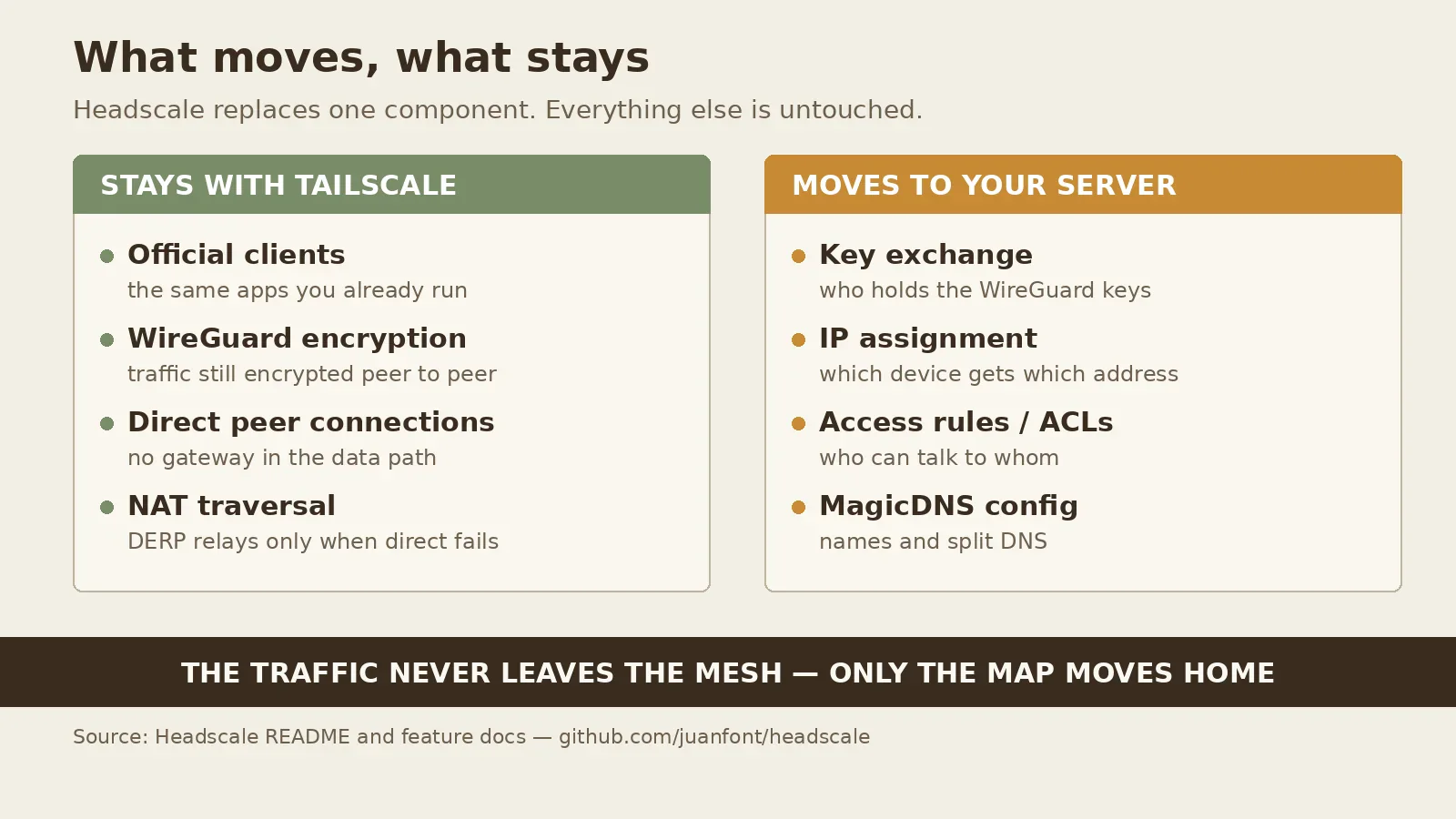
The split is the whole decision. Nothing about the clients changes: you install the same official Tailscale client and point it at your Headscale instance instead of Tailscale's hosted service. The encryption is the same WireGuard, the connections are still direct between peers, and NAT traversal still does the work of getting through firewalls.
What moves is the bookkeeping. Key exchange, IP assignment, access control lists, DNS configuration — all of it lives on your server, in a database you control. Headscale's feature list covers the base Tailscale surface: node registration by web authentication or pre-authenticated keys, MagicDNS, Taildrop file sharing, tags, subnet routers, exit nodes, dual-stack IPv4 and IPv6, an embedded DERP relay server, and policy support including ACLs, grants, and Tailscale SSH — plus single sign-on through OpenID Connect, Funnel, and Serve.
Two limits in that list are worth reading closely. First, OIDC groups cannot be used in ACLs — if you planned to drive access rules from your identity provider's groups, that path is closed. Second, Headscale's own README states that the project does not support or encourage running it behind a reverse proxy or in a container. Plenty of people run it in Docker anyway, but the maintainers' stated position is to run the binary directly.
The honest limits
Headscale is one tailnet. That is a design goal, stated in the README, not a bug that will be fixed later. If you need separate networks, hosted Tailscale gives you that; Headscale gives you one network to carve up with users, tags, and ACLs.
There is no official graphical admin console. Administration is the command line and the API: headscale nodes list, headscale nodes register, headscale users create, and a policy file you edit by hand.
You also own the operations. Headscale is still a 0.x project — v0.29.7, not 1.0 — and its release notes show why that matters: the latest release is a security release, fixing findings from Anthropic's oss-scanner project and the Tailworm report, some of which could cause denial of service. The notes recommend upgrading both Headscale and the Tailscale clients to v1.104.4 or newer as soon as possible, especially for anyone using Tailscale SSH. The minimum supported Tailscale client is v1.80.0.
And there is the backup question. Your tailnet's state — nodes, keys, routes, policies — lives in Headscale's database. Lose it without a backup and you are re-registering every device. Hosted Tailscale absorbs that problem; self-hosting hands it back.
Headscale vs. hosted Tailscale
The comparison is less lopsided than it looks, because hosted Tailscale's free tier is generous: the Personal plan costs nothing and covers up to 3 users and 100 devices, with most features included. Headscale does not save you money at that scale. It costs you a server and your time.
So the reason to switch is not price. It is control and independence. With Headscale, no account with Tailscale Inc. holds your network's keys and device list; there is no hosted service that can change its terms, its pricing, or its availability and take your mesh's coordinator with it.
The other reason is learning. Running Headscale is the shortest path to understanding how a mesh VPN actually works: keys, node maps, DERP relays, ACLs, and exit nodes, all visible in one small Go binary and one config file, instead of hidden behind a hosted dashboard. That is the same instinct behind a home WireGuard mesh we covered the homelab zero-trust angle here.
Getting started
Headscale ships as a single binary with a YAML config file. Heed the README's warning first: select the same GitHub tag as the released version you use, because the main branch may contain unreleased changes.
The shape of a setup is: install the binary, write the config with your server's address and a database path, start it, and register nodes with pre-authenticated keys or through OIDC. Clients connect with tailscale up --login-server=https://your-server. Routes and exit nodes are approved from the CLI; ACLs live in a policy file you write in Tailscale's policy syntax, which Headscale implements, including tests you can run before applying a change.
Start small: one server, a handful of nodes, a policy that allows everything between your own devices and nothing else, and a backup of the database before you depend on it. Add OIDC later, once the basic mesh works. And keep the client versions current — the 0.29.7 release notes are a recent reminder that the client side carries security fixes the server alone cannot apply.
The bottom line
Headscale is the control plane, nothing more, and that is exactly what makes it worth running. It does not replace Tailscale; it replaces the one part of Tailscale that is a hosted service, with the official clients and the same WireGuard mesh — including the gaps, like OIDC groups in ACLs and the missing admin console, stated in the project's own documentation.
If hosted Tailscale's free tier already covers you, stay there; the honest case for Headscale is not cost, it is owning the coordinator. If you want the keys, the IP assignments, and the access rules on hardware you control, with a single tailnet and a CLI instead of a dashboard, Headscale is a mature, actively maintained way to get there.