DNS-over-HTTPS: your lookups are private now — and your network can't see them either
DoH encrypts DNS inside ordinary HTTPS traffic, so your ISP and your own router lose the view they used to have — and the resolver gains it.

On this page
In brief
- DoH wraps DNS queries in HTTPS on port 443 (RFC 8484, 2018), so lookups blend in with ordinary web traffic.
- Your local network loses its view: Pi-hole, parental controls and enterprise filters that read plaintext DNS stop seeing browser lookups.
- The resolver gains the view instead — every domain, plus your IP and HTTP-layer fingerprints that can group queries.
- DoH is transport security, not DNSSEC: it stops on-path tampering but cannot prove an answer is authentic.
- Browsers already ship it — Firefox default in the US since February 2020, Chrome since May 2020 — and each browser decides for itself.
Every time you type a domain name, your device asks the DNS where that name lives. For most of the internet's history that question travelled in plain text, over UDP port 53, readable by anyone on the path: your ISP, the café Wi-Fi, your router. DNS-over-HTTPS wraps it in an ordinary HTTPS request on port 443, where it blends in with your web traffic. The question is now private from your network — and fully visible to whichever resolver you chose. Encryption moved the view. It did not remove it.
What a lookup looks like now
Plain DNS is simple and exposed: a short UDP packet, no encryption, no authentication. Anyone who can see it can read the domain, log it, block it, or answer it with a lie.
DNS-over-HTTPS (DoH), standardised in RFC 8484 in October 2018, maps each query into an HTTP exchange — a GET or a POST — inside a TLS connection. Because it rides on port 443 it is, in the RFC's words, able to "deter unprivileged on-path devices from interfering with DNS operations and make DNS traffic analysis more difficult."
The older alternative is DNS-over-TLS (DoT, RFC 7858, May 2016), on a dedicated port, 853. DoT encrypts the question too, but the traffic is plainly identifiable as DNS: an operator can see that a lookup happened, just not what it asked. DoH goes further — it makes the lookup indistinguishable from a web request.
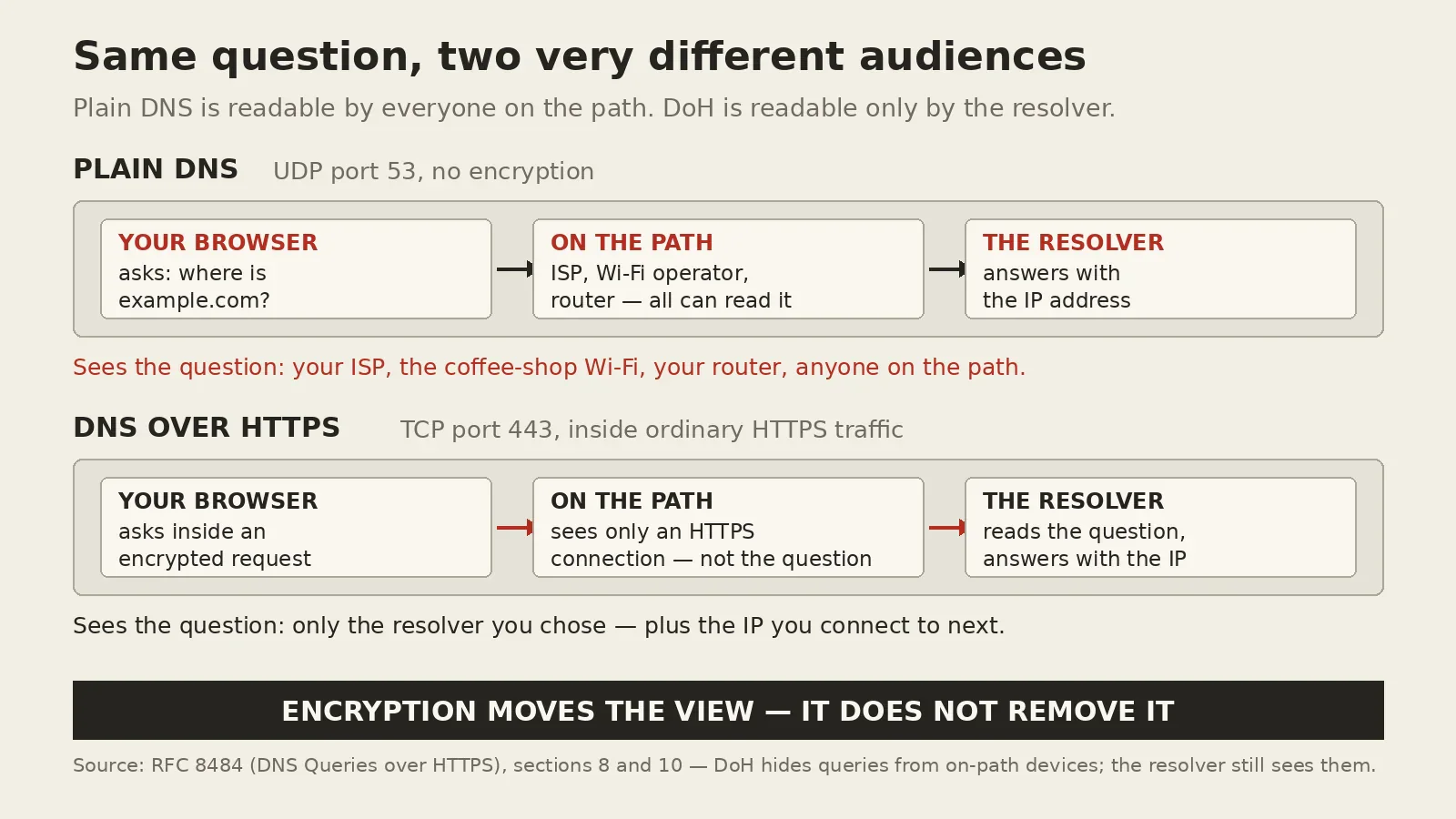
Who loses the view
Your ISP loses the list of domains you visit — and so do the café Wi-Fi, your router, and everything on your network that used plaintext DNS as its window: Pi-hole, parental controls, enterprise filters, malware-blocking resolvers.
RFC 8484 says it plainly: "Filtering or inspection systems that rely on unsecured transport of DNS will not function in a DNS over HTTPS environment due to the confidentiality and integrity protection provided by TLS." The same encryption that keeps your ISP out also keeps your own filter out. Mozilla says the same on its own wiki: its DoH implementation "bypasses system DNS so you might not be using any 'enhanced' DNS services provided by your default DNS server which may include Web Content Filtering or basic Malware Protection, phishing protection."
In one October 2026 test, a site on a NextDNS blocklist loaded normally once the browser's Secure DNS pointed at an outside provider — NextDNS logged nothing. Turn Secure DNS off and the block returned.
This matters beyond ad-blocking. The same DNS logs are the ones defenders use to spot a compromised machine phoning home — the detection behind the FBI's ARTEX warning and the thousand-server AI attack fleet mapped by JPCERT/CC. When the browser resolves names itself, that signal goes quiet for the browser's traffic.
Who gains the view
Encryption moves the view; it does not remove it. Someone still answers the question — and sees all of it.
With DoH, the resolver — Cloudflare, Google, Quad9, NextDNS, whoever your browser points at — sees every domain you look up. RFC 8484's privacy section is candid about the rest: your IP address, HTTP cookies, and TLS session resumption that lets a server correlate one connection with the next. "DoH is not known to introduce new concerns beyond those associated with HTTPS," the RFC says — true, and also the point: HTTPS is itself a tracking surface, and DoH inherits all of it.
Mozilla runs a Trusted Recursive Resolver programme, and the providers Firefox offers must meet its policy requirements — a constraint, not a guarantee: you are still choosing who holds a complete list of everywhere you have been. Firefox's default in the US is Cloudflare; Chrome's is to keep your current provider and upgrade it to its encrypted endpoint — a choice made by a default you never looked at.
What DoH does not do
The most common misunderstanding is that DoH makes DNS trustworthy — it does not. The RFC's security section is explicit: the HTTPS connection "provides transport security for the interaction between the DoH server and client, but it does not provide the response integrity of DNS data provided by DNSSEC." Without DNSSEC, a DoH server can hand a client invalid data — the encryption proves you are talking to the resolver you chose, not that the answer is true.
DoH also does not hide where you go next. It hides the question, not the connection: the IP address you connect to after resolving a name is still visible, and the site you reach still knows you arrived. The DoH server's own hostname must also be resolved before the encrypted channel exists, usually over plain DNS — the first lookup is the one encryption cannot cover.
The browser decides, not your network
DoH is not one setting for the whole machine. It is a setting in every browser, and every browser decides for itself.
Firefox switched DoH on by default for users in the United States in February 2020, using Cloudflare as the default resolver. Its network.trr.mode preference offers off, try-encrypted-first, or encrypted-only. Left at its defaults, Firefox checks a canary domain and stands down when the network signals it should — enterprise policies, parental controls, a VPN.
Chrome followed in May 2020, with Chrome 83: Secure DNS on by default in automatic mode, which only upgrades your current DNS provider to its encrypted version if that provider is on Chromium's list. Pick a provider yourself and Chrome uses it — and drops the unencrypted fallback.
Windows 11's DoH switch only covers lookups through the Windows DNS Client service; a test in October 2026 showed Chrome opening its own DoH connection instead, and Windows' fallback switch had no say over it. Check each browser, not the OS: Firefox's about:networking#dns has a TRR column, and 1.1.1.1/help reports whether encrypted DNS is active.
So what should you do?
First, decide deliberately instead of inheriting a default. If you run Pi-hole, a DNS filter, or parental controls, check the Secure DNS setting in every browser on the network. The filter only works if lookups actually reach it.
Second, if you want encryption without giving up local control, move the encryption to the resolver instead of the browser. Pi-hole forwards to an upstream you choose, and an encrypted upstream is reachable through a companion such as cloudflared or Unbound — then the browser's default path is encrypted and still filtered, and the query log still exists on hardware you own. DNS-over-TLS (port 853) is the network-level alternative: visibly DNS, so your tools can still see lookups happening, even though they cannot read them.
None of this is an argument against DoH: against a hostile network — a café, a hotel, an ISP that sells browsing data — encrypted DNS is a genuine privacy win. The mistake is treating it as a switch that makes DNS private. It makes DNS private from the network in the middle, and hands the whole picture to one resolver. The question is not whether to encrypt DNS, but who you want holding the list of everywhere you have been — and whether the network you own still gets a look.